My experience writing automated tests for a SPA
I think I managed to build quite a nice and interesting test suite recently; I’ll do my best to describe it in this post.
It’s basically just a bunch of notes, and the code is not open-source, but I think these explanations can have more value than raw source code, especially if you want to adapt some of these ideas for one of your own projects.
The application
Let’s start with a quick description of what we want to actually test, because as you can imagine, this is crucial for everything else.
Réécoute is a single-page web application (SPA), i.e., a website rendered with client-side JavaScript1. It’s mainly an audio player, optimized for long recordings (typically 2 or 3 hours), with quite a few interactive features that couldn’t work with server-side rendering alone. It uses React, and the client-side JavaScript communicates with a single server by sending JSON over HTTP. Nothing special.
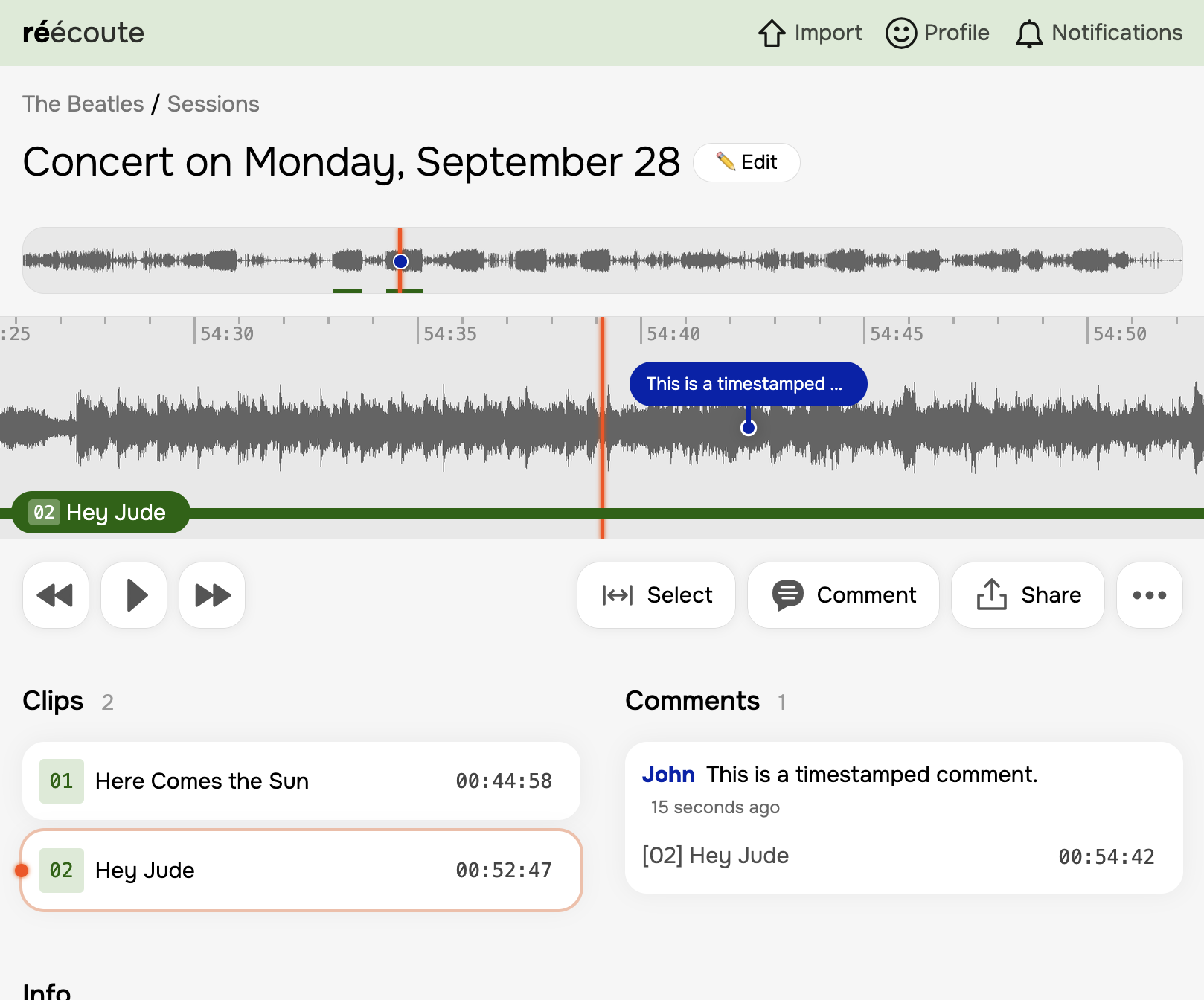
Now, how can we test that? Unlike a classic server-side rendered website, the complexity is split into two roughly equal parts between the backend and the client-side JavaScript. Ideally, we should test both together in a realistic fashion to exercise all the chatter between the client and the server. I’ve made the extreme choice of testing the app as a whole, using a real web browser.
I also wrote a few backend-only tests that I won’t discuss here, because there is really nothing special about them.
The main test suite
The main test suite is written with Playwright, running against a real web browser. It consists of about 20 files, each containing between 1 and 4 test cases.
Regarding my personal preferences: I tend to write rather lengthy test cases that describe full user journeys, rather than small tests for individual steps. For an e-commerce website, for example, I would likely write a test that adds an item to the cart, signs up, goes to the checkout page, and actually purchases the item: it’s the most critical user journey for the business, and you do not want it to break. Of course, I also write smaller, specialized tests for things like sign-up, but IMO these tend to be somewhat less critical than the end-to-end flows.
Data isolation between tests
Tests are not jailed in isolated environments, because:
- When using something like Playwright, this is very complicated to achieve with database transactions;
- I could spawn an instance of the backend for each test, but it would be much slower, so I’m not going to do that;
- Running each test on a tiny subset of the dataset does not help catch database queries that only slow down when there’s a lot of data;
- It’s simply more complicated and less realistic than writing tests that run against the same database without disturbing other tests.
Basically, I write tests just like anyone would use the app in production: each test creates its own objects without relying on any existing data, never touches data it did not create, and never cleans up anything. Data just accumulates. This strategy works really well for apps like Réécoute, where nothing is actually public.
I use a few helper functions to create data (createUser, createBand, createSession, etc.). Note that I do not use before/after hooks at all.
Mocks
The test suite uses two kinds of mocks:
- Each external service has its own global mock: things like S3, Stripe, Twilio, etc. I tend to write one large, realistic mock for each of them. It’s much faster and more reliable than using actual third-party services, and it allows running the tests without an internet connection. These mocks are enabled by default and used across all tests.
- For some complicated cases (emails, especially), I have a few (2 or 3?) custom code paths enabled by test-only parameters/HTTP headers in API queries. These parameters are ignored by the backend in production builds.
(I really hate when a test suite forces you to write custom mocks for every single test…)
Speed
As you can imagine, browser automation is much slower than simply parsing HTTP response bodies, so without parallelism it can quickly become unmanageable. With Réécoute, I went a step further by enabling fullyParallel, so tests within the same file also run concurrently. However, the most important factor here is the app itself, since a test suite can’t be more efficient than the app being tested! To give you an idea, the Playwright suite currently completes in just over 20 seconds on my fanless M3 MacBook Air.
Also, Playwright supports all major web browsers and runs your tests across 3 or 4 of them by default. I changed the settings to only use Chromium: modern browsers behave very similarly, this makes the suite 3 to 4 times faster to run, and it is nearly as effective.
Reliability
Here’s the main downside to browser testing, especially for SPAs: because we are testing an entire app and an entire browser, it’s difficult to make tests perfectly reliable. Yet with a large test suite, you must have high reliability, because the more tests you have, the less reliable the overall suite becomes, and re-running failed suites is expensive.
There is a trick here—it’s not pretty, but it works well: Playwright has a retries option, which I set to 2 in CI. When a test fails, it is retried individually up to 2 times. In practice, tests in Réécoute’s suite rarely fail and retry. I could probably eliminate flakes entirely if I spent a few hours on it, but I’m not sure it's worth the effort right now.
Developer experience
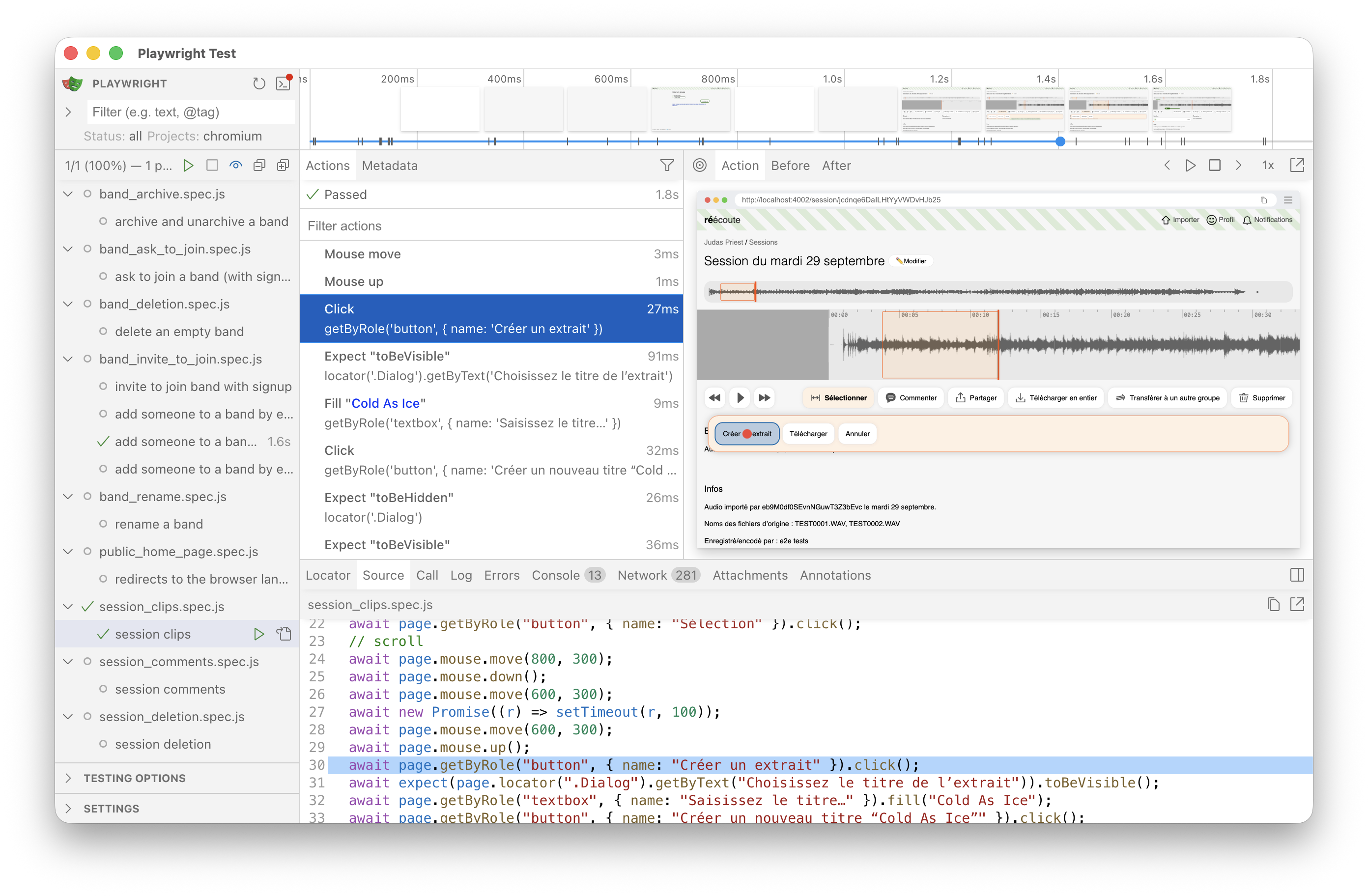
The interactive Playwright UI is great; I use it a lot:
Continuous integration
This is where Playwright really shines: when a test fails, it creates a playwright-report directory containing HTML files that embed the same UI as the interactive Playwright runner, completely standalone! When tests fail in CI, you can simply upload this directory to your favorite S3-compatible cloud storage. It makes troubleshooting easy because the trace files include console logs, network request/response bodies, screenshots, and more.
Running a headless browser in a CI environment is not always straightforward. I use the following Dockerfile:
FROM --platform=linux/amd64 node:22.15.0-bookworm

RUN apt-get update && \
  apt-get install -y --no-install-recommends socat && \
  rm -rf /var/lib/apt/lists/*
COPY package.json package-lock.json playwright.config.js ./
RUN npm ci
RUN npx playwright install-deps
RUN npx playwright install chromium
COPY . .

ENTRYPOINT ["socat", "TCP4-LISTEN:4000,fork,reuseaddr", "TCP4:reecoute_test:4000"]
This image only runs Playwright; the app being tested runs in a separate container. Honestly, I don’t remember why I decided to use socat here—there’s probably a way to make it work without it2.
Miscellaneous tricks I occasionally use
API tests using Playwright
It’s not what Playwright was primarily designed for, but you can write API-only tests with it, using request(), and it works just fine.
Testing emails
I implemented a test-only API route that returns the latest emails for a recipient. It is used like this:
/** Returns emails, newest first */
export const listEmails = async ({ request, recipient_address }) => {
  const res = await request.post(
    "/_api/test_helpers/list_emails",
    { data: { recipient_address } },
  );
  expect(res.ok()).toBeTruthy();
  const { emails } = await res.json();
  return emails;
};

const readOtpEmail = async ({ page, recipient_address }) => {
  const emails = await listEmails({ request: page.request, recipient_address });
  const email = emails[0];
  expect(email.subject).toMatch(/^Your code is [0-9]{6} - Réécoute$/);
  const code_match = /<h2>([0-9]{6})<\/h2>/.exec(email.html_part);
  expect(code_match).toBeTruthy();
  return code_match[1];
};
The API route is disabled in production builds.
Simulating mouse movements and clicks
I managed to write this one:
…
// wait until the player is loaded
await expect(page.getByRole("button", { name: "Play" })).toBeEnabled();
await page.mouse.move(800, 300);
await page.mouse.down();
await page.mouse.move(700, 300);
await new Promise((r) => setTimeout(r, 100));
await page.mouse.move(700, 300);
await page.mouse.up();
await page.getByRole("button", { name: "Select" }).click();
// scroll
await page.mouse.move(800, 300);
await page.mouse.down();
await page.mouse.move(600, 300);
await new Promise((r) => setTimeout(r, 100));
await page.mouse.move(600, 300);
await page.mouse.up();
await page.getByRole("button", { name: "Create a clip" }).click();
…
You may find it ugly, but it tests an important feature I really don't want to break. And believe it or not, despite the setTimeout()s, it is surprisingly reliable!
Things that could be improved
Test coverage isn't measured at the moment 🙃. However, the most critical user journeys and all the “happy paths” of the important features are tested. I don’t mind if obscure code paths aren't covered—I just don’t want any critical bugs.
I’d really like to set retries to zero in CI, and I don't think I'm far from that goal. I'm just too lazy to tackle it right now!
- In fact, Réécoute is also server-side rendered for speed, SEO, and the rare nerds who browse with JavaScript disabled. However, the primary features are unavailable without client-side rendering.
- I can tell that it was my own decision to use socat—no LLM was involved here! It’s a great example of a situation where a comment would have helped…